
Operations & Manufacturing
Finite Capacity Scheduling: Why Your Production Schedule Keeps Moving
Most production plans break the first week you are genuinely full. Here is what a scheduler has to model to place work where machines are actually free — and how to stop the plan churning until the floor stops trusting it.
Ask a shop foreman what they think of the production schedule and you will usually get one of two answers. Either "we don't really use it," or a laugh. Both mean the same thing: at some point the schedule said something impossible, everyone noticed, and the whiteboard came back.
That failure almost always has the same root cause. The schedule was built as if capacity were infinite — as if a machine that already has ten hours of work on Tuesday can absorb an eleventh. It cannot, so from Tuesday onward every date on the plan is fiction, and a plan people know is fiction is worse than no plan at all.
Finite-capacity scheduling is the fix, and it is not exotic. It means the software refuses to place work where the machine is not actually free. This guide covers what that changes, what a scheduler has to understand about your floor to do it properly, and the part almost nobody talks about: how to keep a schedule from churning so much that the floor stops trusting it anyway.
Why spreadsheet planning fails at exactly 100%
A spreadsheet plan is a promise ledger. Each order gets the date the customer was given, and the sheet adds up beautifully. What it never asks is whether the hours fit.
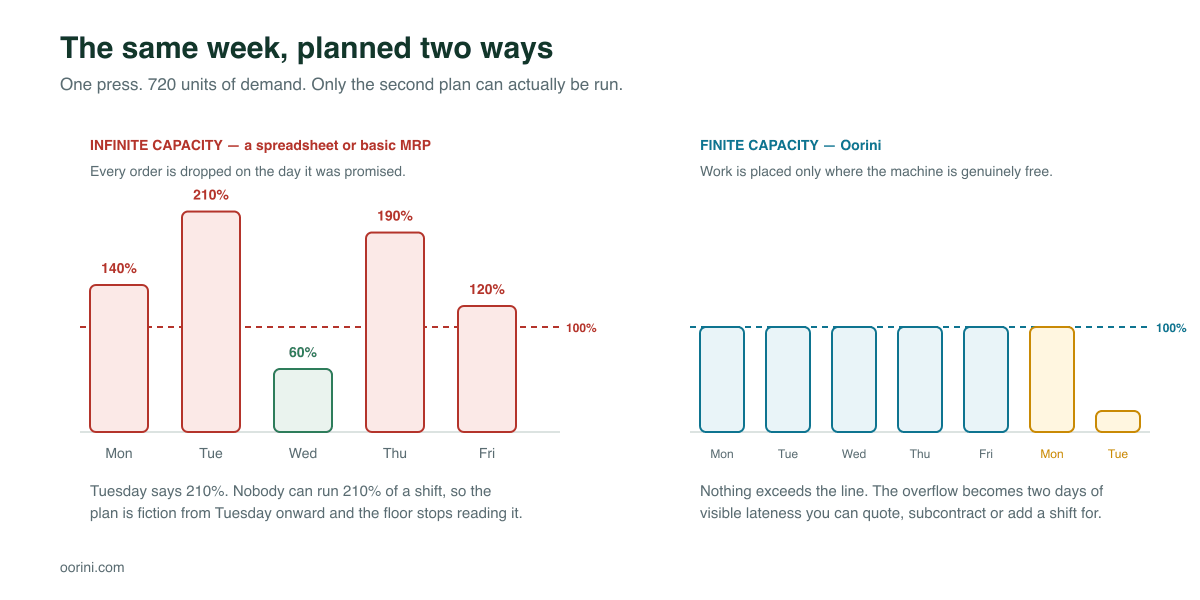
Look at the left side of that chart. Monday is at 140%, Tuesday at 210%. Nobody runs 210% of a shift. So on Monday afternoon someone makes a judgement call about what actually goes on the machine, and that call is invisible to the plan. By Wednesday, the plan and the floor are describing different factories.
The right side is the same work placed against real availability. Nothing exceeds the line, and the overflow becomes something far more useful than an impossible percentage: two specific days of visible lateness. That is a number you can act on. Quote a longer lead time, add a Saturday shift, subcontract the overflow, or call the customer early — which is always cheaper than calling them late.
Infinite-capacity planning does not remove the overload. It just moves the discovery of it from the office to the shop floor, three days later.
What a scheduler has to know about your floor
Placing work where a machine is free sounds simple until you look at what "free" means in a real plant. Oorini's scheduler models each of these because leaving any one out puts the plan back into fantasy.
Availability, not just a calendar
A machine is available during rostered shifts, minus planned maintenance, minus recorded downtime. A one-shift line and a two-shift line are different machines as far as a due date is concerned.
Setup time, and what ran before
Changing a press from black to white costs more than white to white. Steps carry a setup family, and the scheduler can be told to prefer sequences that keep the same family together. On a job shop running short batches this is frequently the single largest recoverable loss on the floor.
People, not just machines
A step can require two operators and a specific skill. A machine standing free while nobody qualified is on shift is not capacity, and a scheduler that counts it as capacity will promise dates you cannot hit.
How many machines a step may use
Some steps can be split across several machines, some must run on one line as a composite, and some can run on any one of a set of alternatives. Splitting is not always worth it, so the policy carries thresholds — a minimum lot size and a minimum saving, in both minutes and percent, below which splitting a job across two machines is just two setups instead of one.
Four ways one step can wait for another
This is where most scheduling tools quietly give up. They understand "B starts after A finishes" and nothing else — and that single assumption inflates lead times across the whole plant, because it is often not true.
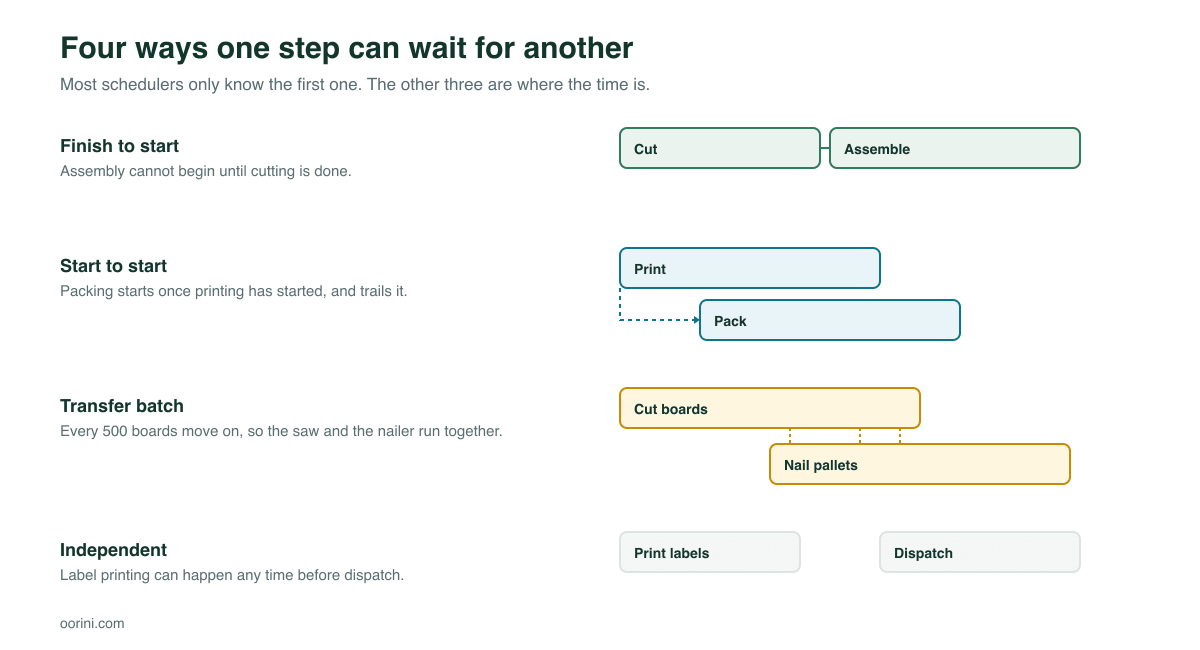
- Finish to start. The classic. Assembly waits for cutting to finish.
- Start to start. Packing begins shortly after printing begins and trails it, with a lag. Two steps overlap for most of their length.
- Transfer batch. The one that matters most in practice. Every 500 boards move to the next station, so the saw and the nailer run at the same time instead of one after the other. On a multi-step job this is often the difference between a three-day lead time and a one-day one.
- Independent. Label printing has to happen before dispatch but is not waiting on anything. Do not let it pin the critical path.
Steps in the same parallel group run concurrently rather than in sequence, so a workflow can fan out and rejoin the way the real process does.
Forward, backward, balanced or setup-optimised?
The same demand and the same machines produce different plans depending on what you are optimising for. Four strategies, and each has an honest reason to exist:
- Forward — start everything as early as possible. Finishes soonest, carries the most work in process. Right when you are chasing capacity.
- Backward — work back from the promised date so material is consumed as late as safely possible. Lowest WIP and lowest carrying cost, but no slack if anything slips.
- Balanced — spread load across available machines rather than filling the fastest one first.
- Setup-optimised — sequence by setup family. On short runs with long changeovers this recovers more hours than any other single change.
Job priority is respected first in every strategy — urgent before high before normal — and due date breaks the tie.
The part nobody talks about: schedule churn
Here is the failure that kills good schedulers. You install a proper finite-capacity engine. It works. Then a rush order lands on Tuesday morning, the system replans, and eleven jobs move. The floor had already staged material for three of them. Next Tuesday the same thing happens.
Within a month, nobody looks at the schedule, and you are back to the whiteboard — not because the maths was wrong, but because the plan kept moving underneath the people following it.
So the interesting question when demand changes is not "is the new plan better?" It usually is. The question is: did it move anything that was already committed?
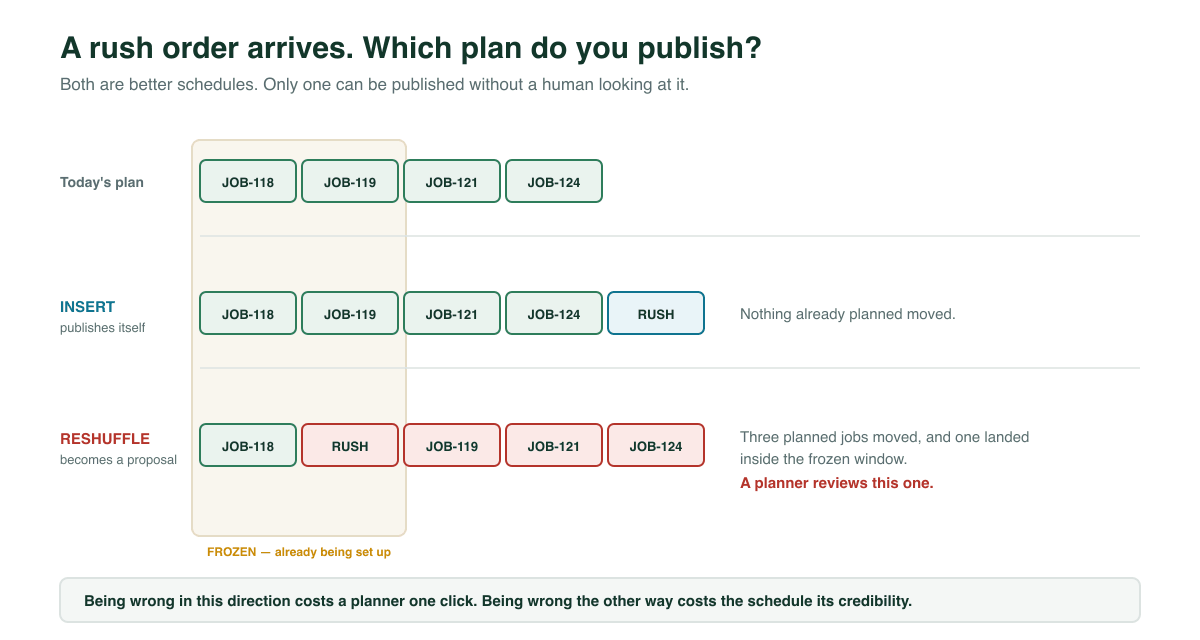
Oorini compares every candidate plan against the published one and sorts the difference into three buckets: work that is new, work that moved, and work that disappeared.
- A plan that only adds slots is a pure insert. Nothing anyone was relying on has changed, so it publishes itself.
- A plan that moves or drops existing work becomes a proposal. A planner sees what moved and by how much, and decides.
On top of that sits a frozen horizon — a window at the front of the schedule covering work that is already being set up. Moving something inside that window is not a scheduling decision, it is a disruption on the floor, and it blocks automatic publishing outright.
Being too cautious costs a planner one click. Being too eager costs the schedule its credibility, and you only get that back the hard way.
What you should expect to see in the first month
Finite-capacity scheduling is not a productivity feature; it is an honesty feature. The gains follow from being able to see the truth earlier:
- Lateness surfaces at quoting time, not on the ship date. Most of the value is in the phone calls you no longer have to make.
- Overtime becomes a decision. You can see the specific overloaded days far enough ahead to choose a Saturday shift deliberately rather than discover it on Thursday.
- Changeovers drop on any shop running short runs, once setup families are set up and the setup-optimised strategy is on.
- Quoted lead times get shorter, not longer — because transfer batches and parallel steps let the plan overlap work that a naive scheduler would have queued end to end.
Frequently asked questions
No, and waiting for perfect data is the most common way this project never starts. Begin with your best estimate per step. Oorini records actual times against those estimates as work runs, so the plan gets more accurate from use rather than from a data-entry project.
No. The constraint is what matters, not the count. A shop with one bottleneck press and six other stations gets most of the benefit, because the press is where every promise is really made. Small plants often see the effect faster than large ones.
Recorded output and downtime feed back into the schedule, so the next plan starts from where you actually are. A schedule that cannot absorb reality is a schedule people stop updating.
Yes. A manual move keeps the workflow sequence intact — dropping a step earlier snaps it to the end of the step before it, and dropping it later pushes anything downstream that would otherwise overlap. The planner stays in charge; the tool just refuses to produce a sequence that cannot be run.
Most accounting and inventory systems schedule by due date only: they tell you what should be done by when, without ever checking whether the hours exist. That is planning, not scheduling. The difference shows up the first week you are genuinely full.
Not to plan. Scheduling works from your workflows, times and machines regardless of how you record execution. How much you capture on the floor is a separate choice — see our guide to MRP and Traceable production modes for that decision.
Where to start
You do not need a perfect model to get value. In order of payback:
- Get your real availability in — shifts and planned maintenance, per machine. This alone converts a fantasy plan into an honest one.
- Set estimated times per step, even rough ones, and let actuals correct them.
- Mark the dependencies that are not finish-to-start. Every transfer batch you declare takes real days out of your quoted lead time.
- Set setup families if changeovers are a meaningful part of your day.
- Turn on the frozen horizon before you turn on automatic publishing, so the schedule earns trust before it starts changing on its own.
A schedule is only worth as much as the floor's willingness to follow it. Finite capacity is what makes it possible to follow; the insert-versus-reshuffle rule is what makes people willing to.