
Sales & Growth
Your Website Should Write the Quote: AI Storefronts With Automatic Quoting
Small manufacturers do not lose bids on price — they lose them on Tuesday. Here is how an AI-built site wired to your catalogue turns a quote request into a priced, numbered quote before you have read the email.
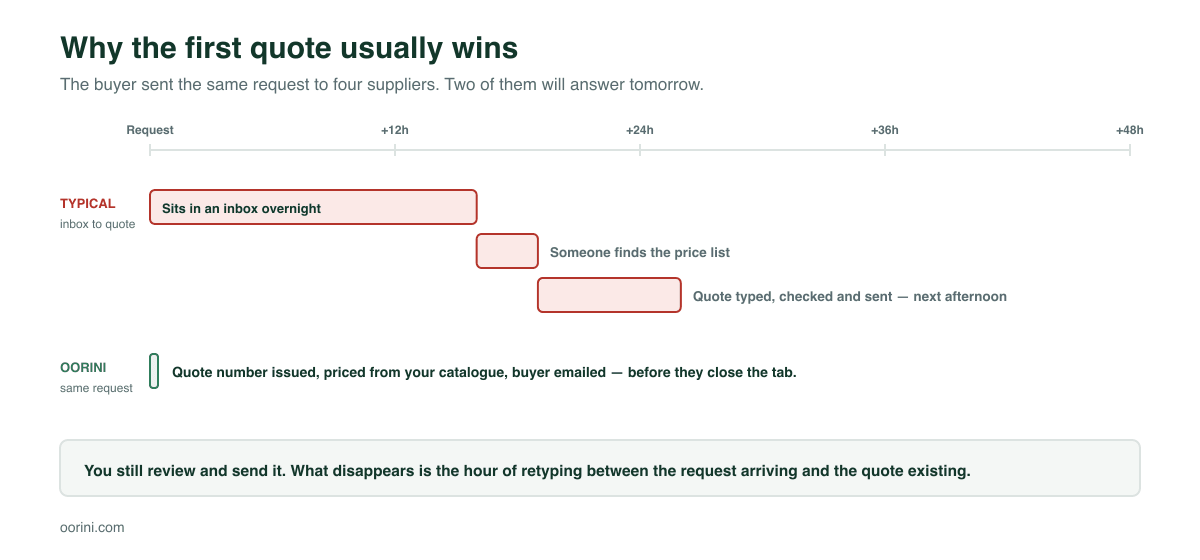
Most small manufacturers lose work they never knew they were in the running for. A buyer finds three suppliers, sends the same request to all of them, and takes the first credible answer. If your reply arrives tomorrow afternoon, you were not beaten on price. You were beaten on Tuesday.
The gap is almost never effort. It is that a request from your website lands in an inbox, and everything after that — finding the company, checking whether they have bought before, looking up a price, opening a template, typing it out — is a person doing data entry before any selling happens.
Oorini closes that gap by making the website and the quoting system the same system. Your site is built by AI from the products you already have, and when a buyer asks for a price, the quote is written before you have read the email.
Why a separate website is where the time goes
Most small manufacturers end up with two disconnected things: a website somewhere, and the system where the business actually runs. The website has a contact form. The form sends an email. And every request costs somebody twenty minutes of retyping information that already exists.
Worse, the two drift apart. Prices change in one place and not the other. A product gets discontinued and stays on the site for a year. The website slowly becomes a brochure nobody trusts, which is why so many owners quietly stop maintaining it.
A website that cannot see your catalogue is a brochure. A website that can is a sales channel.
The site builds itself from what you already have
Oorini's site builder is a conversation, not a page editor. You describe the buyer you want to impress — "a premium industrial supplier site with capacity proof, delivery confidence and a clear quote button" — and it rebuilds the hero, section order, proof points, product copy, palette and call to action around that.
What makes it useful rather than generic is what it reads first:
- Your real company record — name, description, industry, certifications, contact details, year established.
- Your real listings — up to twenty products with their descriptions, categories, price ranges and photos. It can only feature products you actually have, because it works from their IDs.
- Your existing web presence, if you have one. The importer pulls a name, description, phone, address, year established, certifications and social links off a site or profile so you are not starting from a blank page.
It publishes to yourname.oorini.com or to your own domain, with the SEO metadata generated alongside — tags, keyword phrases, product descriptions and page structure that give a small supplier a genuine chance of turning up in a search.
The listings are the products, not copies of them
This is the part that quietly matters. A listing on your public site links to the product record in your inventory. It is not a duplicate you have to remember to update. The price a buyer sees and the price your quote uses are the same number, from the same row, forever.
What actually happens when a buyer asks for a price
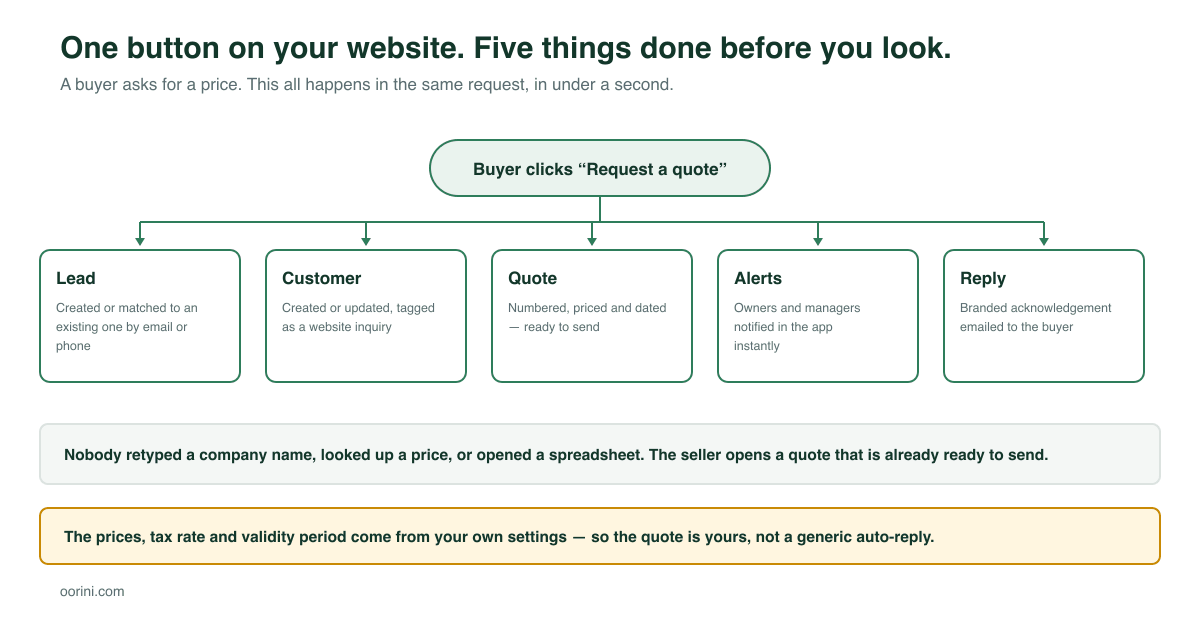
A visitor fills in a short form — company, contact, quantity, and what they need. They click Request a quote. In that same request, before the page has finished responding, Oorini does all of this:
- Matches them against people you already know. It looks up the email and phone against your existing leads and customers. A returning buyer does not become a duplicate; an existing customer is recognised as one.
- Creates or updates the lead, tagged as coming from your website, with the product, quantity, page and message recorded against it — and logs the activity on the timeline.
- Fires your CRM automations. Whatever you have set to happen on a new lead happens now, including enrolling them in a follow-up sequence.
- Creates the customer record, so the quote has somebody to belong to.
- Writes the quote. A real quote number, the product priced from your catalogue at the quantity they asked for, your default tax rate applied, and a valid-until date from your own settings. It lands in Ready to send.
- Tells your team. Owners, admins and managers get an in-app notification immediately.
- Replies to the buyer with a branded acknowledgement — your logo, your brand colour, and the quote reference — so they know a real supplier is on it.
The buyer's experience is that they asked a small company for a price and got a professional response instantly. Your experience is that you open Oorini and find a quote waiting for a decision, not a blank form waiting for typing.
It is your quote, not an auto-reply
There is a fair objection here: automatic quoting sounds like the fastest way to send somebody a wrong price. That is why nothing on the quote is invented.
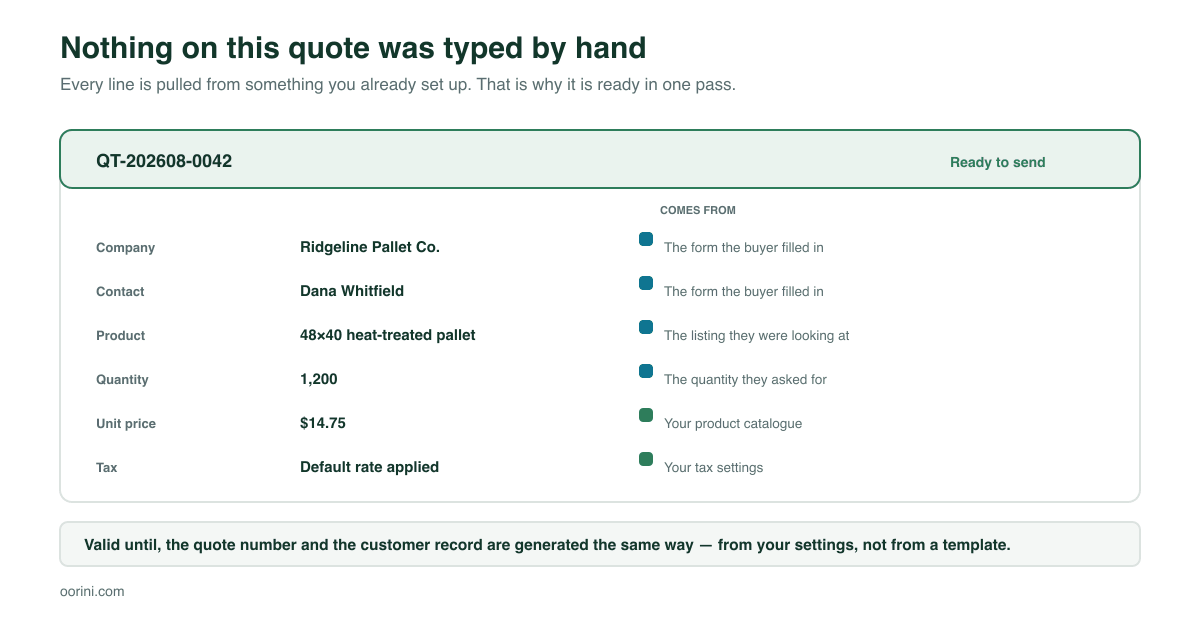
The quantity, company and contact come from what the buyer typed. The unit price comes from your product catalogue. The tax rate, the default validity period and the quoting location come from your settings. The quote number follows your own sequence.
And critically: the quote is created, not sent. It sits in Ready to send until a human looks at it. You can change the price, add freight, apply a discount, adjust the terms, or throw it away. What has been automated is the clerical half — the half that was costing you a day.
Where this fits for a US small manufacturer
A few situations where the difference is largest:
- You are the estimator and also the owner. Requests pile up until evening because you were on the floor. Now the buyer has an acknowledgement and a reference number within seconds, and you review five quotes in ten minutes instead of writing five from scratch.
- Your products have a standard price per unit. Pallets, packaging, fasteners, sheet goods, stock fabrications — anything with a catalogue price is quoted correctly the first time.
- You are bidding against larger suppliers. Big competitors have a quoting desk. This is how a twelve-person shop answers as fast as a two-hundred-person one.
- Your website generates enquiries you never followed up. Every request becomes a lead, a customer and a quote in your pipeline, so nothing sits unanswered in a shared mailbox.
From quote to order to the floor
The reason this works is that the quote is not a document — it is a record in the same system as everything downstream. Accept it and it becomes an order. The order becomes a production job with materials checked against stock. The job finishes, gets dispatched, and is invoiced from the same chain, with accounting sync at the end.
If you want the detail on the production half of that chain, our guides on choosing a production mode and scheduling against real capacity pick up exactly where this one stops.
Frequently asked questions
No. The quote is created in Ready to send and waits for a person. The only thing the buyer receives automatically is an acknowledgement confirming what they asked for and giving them a reference — no prices.
Set a listing to "Ask for price" and the request still creates the lead, the customer and the draft quote with the quantity and requirements attached — you just fill in the number. You keep the speed on the admin and keep the pricing judgement.
There is nothing to sync. A listing points at the product record, so a price change is a price change everywhere. That is the main reason this is faster than bolting a form onto a separate site builder.
Yes. Sites publish to a subdomain by default and can be pointed at a custom domain, so the site can be your primary web presence rather than something extra to maintain.
They are matched on email and phone, so the second request updates the lead you already have instead of creating a duplicate. The history stays on one timeline, which is what makes follow-up worth doing.
No, and it is not trying to. It removes the part of the job nobody wanted — locating the customer, looking up the price, formatting the document — so the time goes into the conversation instead. The judgement calls stay with you.
Where to start
- Get your products in with real prices. Everything downstream is only as good as your catalogue, and this is the step that pays for itself twice.
- Publish listings for the products you want enquiries on, and let the AI generate the descriptions, tags and keywords.
- Build the site by describing your buyer, then adjust. Import your existing site first if you have one.
- Set your tax rate, quote validity and default location, because those are the settings the automatic quote reads.
- Watch the first week of quotes before you change anything. The gap between what the system produced and what you would have written tells you exactly which defaults need adjusting.
The goal is not to take you out of the sale. It is that by the time you are in it, the paperwork is already done.