
Operations & Manufacturing
MRP vs Traceable Production: Which Manufacturing Mode Fits Your Shop?
Flat bill of materials or multi-level? That one question decides whether you need MRP planning or full shop-floor traceability — and picking wrong breaks your purchasing.
Every manufacturing system asks you one question early on, and most of them ask it badly: how much detail do you want to record on the shop floor? Nobody can answer that in the abstract. Ask a 12-person cabinet shop in Ohio whether they want "full traceability" and they will say yes, because who says no to that — and then spend the next six months fighting a system that wants a barcode scan for every board.
Oorini asks a different question: how deep does your bill of materials actually go? That one has a real answer, and it decides everything else. It splits manufacturers into two groups, and Oorini now ships exactly two production modes to match them: MRP and Traceable Production.
This article explains what each mode does, which one fits your shop, what it costs you to pick the wrong one, and how to switch later if you grow into the other.
The question underneath: flat BOM or multi-level BOM?
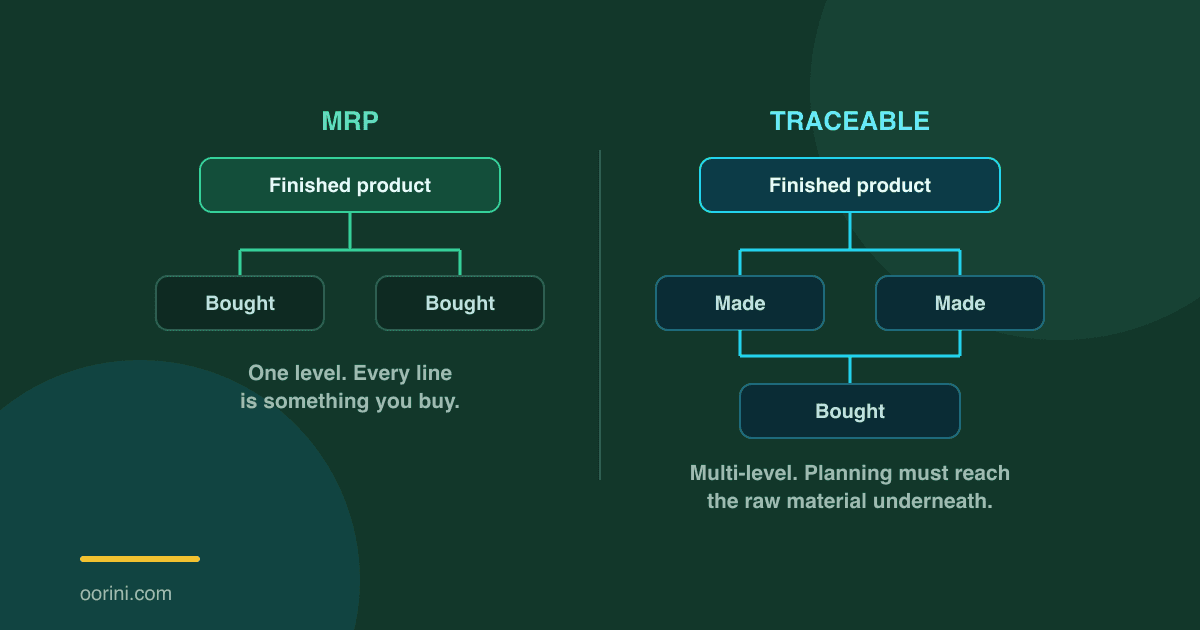
A flat bill of materials has one level. Your finished product sits on top, and every line beneath it is something you buy from a supplier.
A 4-foot LED shop light is an extruded aluminium housing, an LED board, a driver, a lens and a bag of hardware. You buy all five, you assemble, test and box them, you ship fixtures. There is no half-finished thing that anyone counts, holds in a rack, or makes ahead of demand. One level down and you have hit purchased material.
A multi-level bill of materials goes deeper. A 48×40 GMA pallet is stringers and deck boards — but you do not buy stringers. You buy hardwood lumber and cut them. Those cut boards sit on a cart with a count on them. Someone decides on Tuesday to run boards and on Thursday to assemble pallets. That is two levels, and the second one is where the money is.
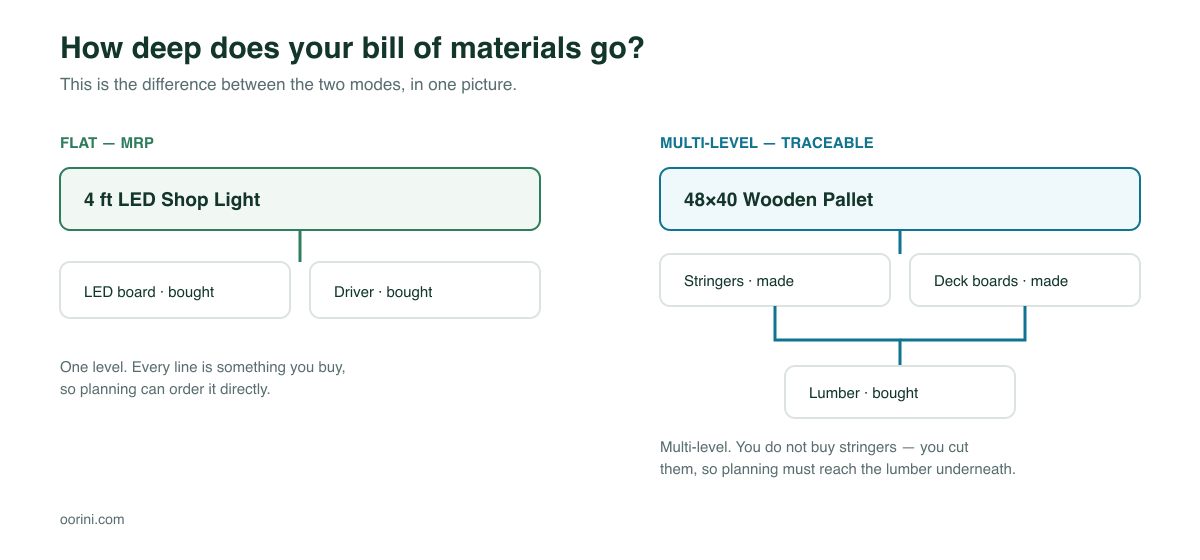
This is not a preference. It is a fact about your product, and you already know the answer. Which is why it makes a far better basis for the decision than "how much detail do you want."
MRP mode: plan, cost, and deduct — without a shop floor
MRP mode is for manufacturers whose BOM is flat. It gives you the full planning and costing engine and deliberately leaves out the floor-tracking machinery you would never use.
What you get
- Materials, BOMs, purchasing and requirements. Orders explode into material demand, net against stock and open POs, and tell you what to buy and when.
- Workflows with times, costs, machines and operators. You still define your process steps — cut, mould, assemble, pack — with cycle times and rates, because that is how a job gets costed properly. Workflows are not a Traceable-only feature.
- Work progressed from the job page. A step strip on the job, advanced by whoever is running the office. No terminal on the floor.
- Material deducted automatically when you post the finished quantity. Post 1,200 fixtures and the housings, boards, drivers, lenses and hardware come off stock at BOM rates. The job closes itself.
- Optional actual times and operator per step. If a supervisor knows the press ran 90 minutes instead of the 60 you estimated, they can enter it and labour cost follows the real number.
What you do not get
- The shop-floor kiosk
- Intermediate materials and work in process
- Lot genealogy — you cannot answer "which batch went to which customer"
- Measured yield, so material lost inside a step is not visible
That list is short on purpose. In a flat-BOM shop none of it has anything to attach to.
MRP is not "the cheap version." It is the complete version for a company whose product does not pass through stock on its way to being finished.
How an MRP job actually closes
This is the part that trips people up in other systems. In MRP there is no operator to close a step, so Oorini closes them for you when the full quantity is posted. Every step gets a time — the measured one if somebody entered it, otherwise the estimate from your workflow.
Crucially, those two are tagged differently. A step closed on an estimate is stamped as an estimate. Your reports can always separate a prediction from a measurement instead of averaging them into a number that is neither. And Oorini tells you before you post: "3 steps will be closed using the estimated time, because no actual time was entered."
Traceable Production: every stage is real stock
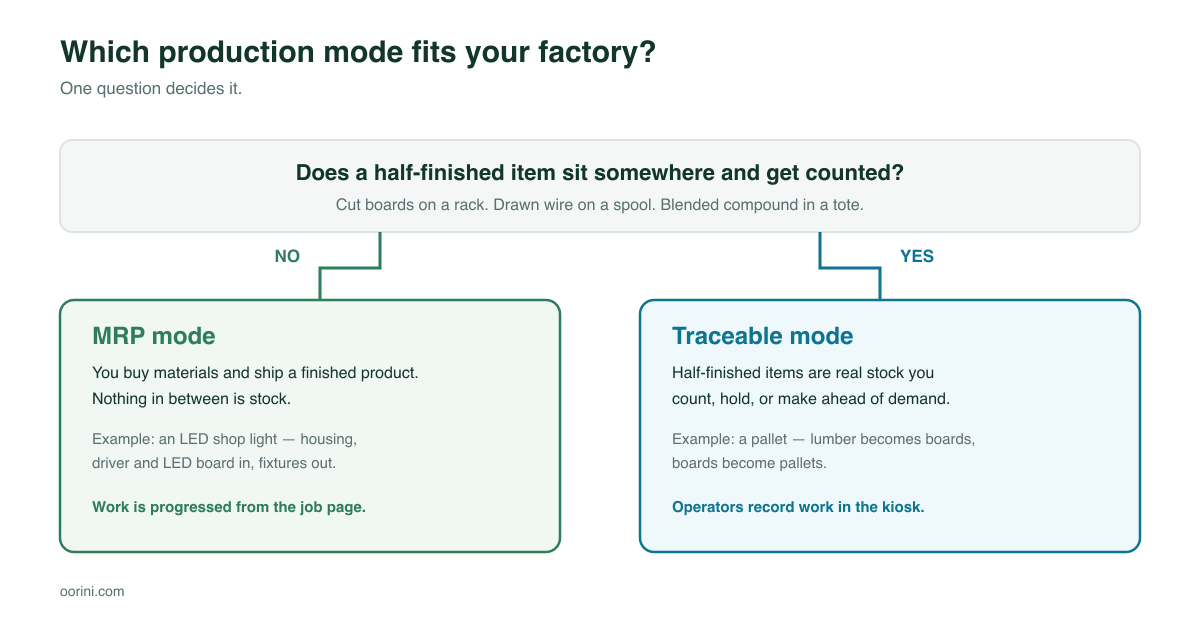
Traceable mode is everything MRP has, plus a shop floor. Choose it when the half-finished item is genuinely inventory — something you count, hold, or build ahead of demand.
- Intermediate materials tracked as their own stock. Cut deck boards have a quantity, a location and a value.
- Recipes, so requirements explode through every level down to raw material. An order for 100 pallets reaches board feet of lumber, not "300 stringers" you cannot buy.
- The kiosk, a touch-screen station where operators record what they consumed and produced, step by step.
- Work in process, derived live from open runs rather than guessed at month end.
- Lot genealogy, so a recall question — which finished lots contain material from supplier batch 4471? — has an answer in seconds.
- Measured yield, so the 4% you lose in drawing or trimming shows up as a number instead of a mystery variance.
- Starting a workflow mid-way when the parts are already on hand, because you ran boards last week.
MRP vs Traceable: the full comparison
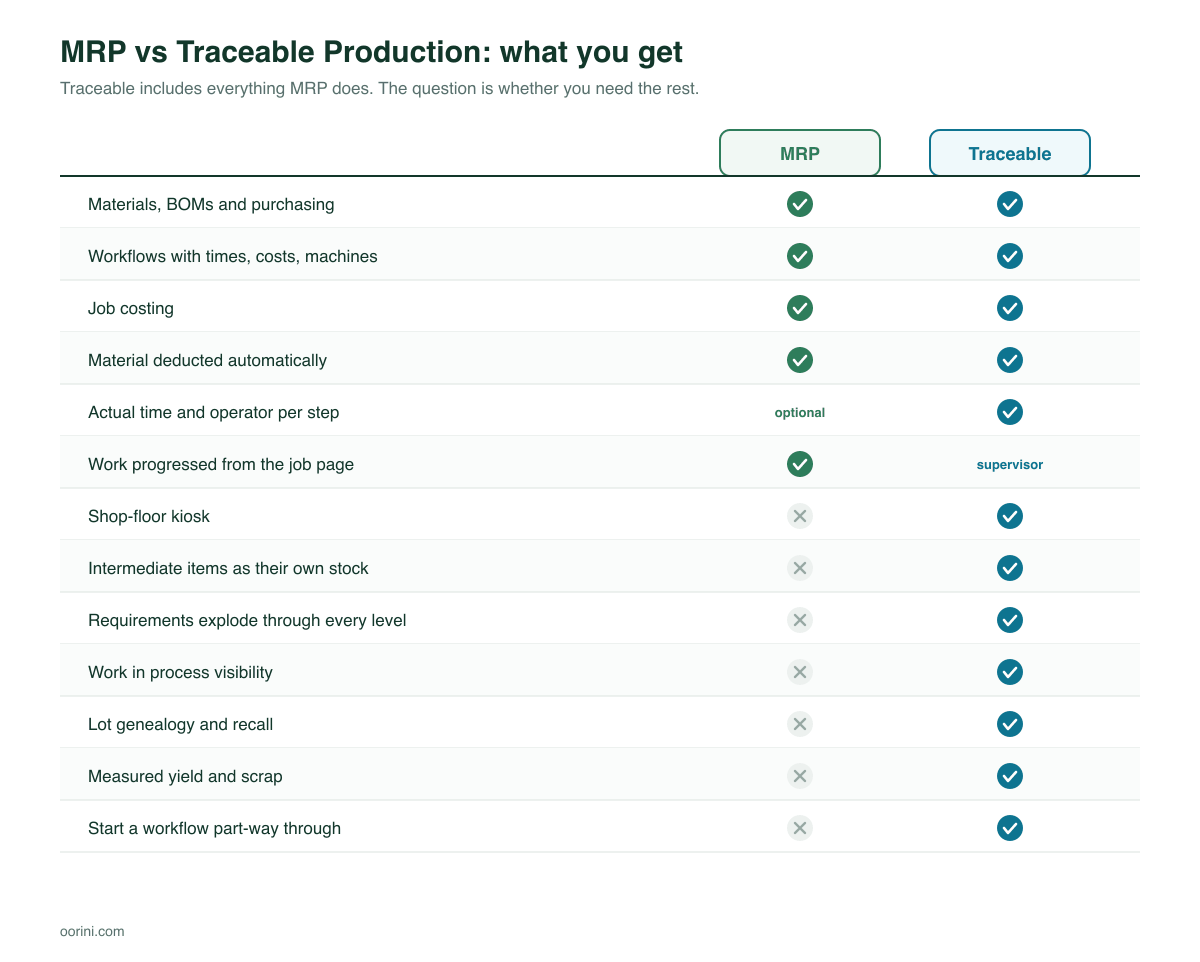
The pattern worth noticing: Traceable is a strict superset. Nothing is taken away when you move up. The features that differ are the ones a flat-BOM shop has nothing to point at.
The expensive mistake: a multi-level BOM in a flat-BOM system
Here is the failure mode we built the split to prevent, and it is not hypothetical — we found two workspaces doing it in our own demo data.
A pallet manufacturer sets up in MRP mode because it looked simpler. They enter the pallet's BOM honestly: 3 stringers, 9 deck boards. An order for 500 pallets arrives. Planning does its job and reports what it sees:
Purchase 1,500 stringers and 4,500 deck boards.
Except you do not buy stringers. You cut them. Nobody is going to sell you 1,500 stringers, and meanwhile the lumber you actually needed goes unordered. You find out on the Thursday you planned to assemble.
MRP mode now refuses that BOM line at the point of editing. If a component is something you make rather than buy, MRP will not let it into a bill of materials, because a purchase order for the wrong thing is far more expensive than a warning at setup time. That refusal is the honest one: without recipes there is no way to explode through the stringer to the lumber underneath.
And the mistake in the other direction
Running a genuinely flat product in Traceable mode is not dangerous, just wasteful. You get a kiosk nobody logs into, a work-in-process figure that is always zero, and an intermediate inventory tab with nothing in it. Operators are asked to record consumption for a step that has exactly one input at a fixed rate. The discipline costs real time and buys nothing.
Five questions that settle it
Answer these about the product you make most of:
- Is there anything half-finished that you count? If there is a rack, a cart or a shelf with a number on it that is not raw material and not a finished good, you are Traceable.
- Do you ever make a component ahead of demand? Running boards on a slow Tuesday to keep the saw busy is intermediate inventory, whether or not you call it that.
- Could a customer call you about a defect and need to know which raw batch it came from? Food, pharma, aerospace, automotive, anything under FSMA, ISO 9001 or a PPAP requirement — Traceable.
- Does material get lost between the start and the end of a step, in a way that matters? Trim loss, scrap rate, drawing loss. If you want that measured rather than assumed, Traceable.
- Does every line of your BOM come from a supplier? If yes to this and no to everything above, MRP is the right answer and the simpler system is a genuine benefit.
Most US shops under about 50 employees making assembled or moulded goods land in MRP. Most shops doing fabrication, cutting, converting, or anything in a regulated industry land in Traceable.
Choosing during setup — and changing later
Oorini asks this during onboarding with both options laid out side by side, each with a worked example rather than a feature list. You pick, and the rest of the product configures itself: the navigation, the BOM editor's rules, the workflow generator, and what the job page shows you.
Even the AI workflow generator follows the mode. Ask it to build a process for your product in MRP and it will produce steps, times and costs — and deliberately no intermediates, because a workflow it cannot plan against is worse than no workflow.
Moving up is free. Moving down has one rule.
MRP to Traceable is always allowed. Nothing is lost; you gain surfaces. Worth knowing: switching up does not reconstruct history. Times that were closed on estimates stay estimates. Traceability starts the day you turn it on.
Traceable to MRP is blocked while you still hold intermediate stock or have unfinished production runs — and Oorini tells you exactly what is in the way, for example "4 intermediate items still holding stock and 2 unfinished production runs." The reason is simple: MRP cannot display intermediate materials, so switching would hide inventory that physically exists on your floor while it sits in your books. That is how a company quietly stops reconciling. Consume or write off the stock, close the open runs, then switch.
Frequently asked questions
No. Workflows, cycle times, machine rates, operator rates and cost rollups all work in MRP. That is the point of the mode. What you lose is measured yield and per-operator kiosk time, not costing itself.
The mode is set per workspace, not per product. If any significant part of your catalogue passes through an intermediate you count, choose Traceable — running your flat products inside Traceable costs you a little discipline, whereas running your multi-level products inside MRP breaks your purchasing.
They need something with a browser. The kiosk is designed for a shared touch-screen station on the floor with PIN sign-in, not a device per person. One terminal per work centre is a normal setup.
Then it is not really a level — it is a step. Model it as a workflow step in MRP with the material consumed at the end. The test is whether anyone would ever count it, not whether it has a name.
Yes, meaningfully. You define recipes for each conversion in addition to BOMs. That is real work, and it is why picking Traceable for a genuinely flat product is a bad trade rather than a safe one.
The short version
If every line of your bill of materials is something you buy, choose MRP. You get planning, purchasing, workflows, costing and automatic material deduction, and you are not asked to run a floor you do not have.
If your BOM passes through something you make, count, or hold, choose Traceable Production. You get all of the above plus recipes that explode to raw material, intermediate stock, WIP, measured yield, lot genealogy and the kiosk.
The two modes exist because those are two genuinely different businesses, and pretending otherwise is how manufacturing software ends up half-used. Pick the one that matches your product, not the one with the longer feature list.